How to Improve Your Shopify SEO
Some basic search engine optimization (SEO) work can get your Shopify store to appear in search results, but you’ll need to keep refining your strategy to get your traffic and sales to where they could be. Learning how to improve SEO on Shopify requires getting into technical aspects of search optimization and potentially investing in a keyword research tool and writing services.
Please note that this is a guide to further improving Shopify SEO. If you are looking to optimize your Shopify store for the first time, see our Shopify SEO checklist. Many of the following points apply to ecommerce websites on other platforms as well. However, this article will provide instructions specific to the Shopify platform.
Improve Your Site Structure
The infrastructure of your Shopify website has a huge impact on search engine optimization for two key reasons:
An effective site structure is necessary to help Google bots crawl your site, find new pages, index them, and serve them to internet users. Showing up in organic search results is one of the best ways to drive traffic to your Shopify store.
An effective site structure is critical for user experience (UX) and increasing your Shopify conversion rate.
Poor site structure is one of the things our Shopify SEO agency sees most frequently with new clients. We also see some of the greatest gains when site structure is improved.
The structure of your Shopify ecommerce site must make it easy to navigate and use. It must also show how different pages are connected so that both potential customers and Google bots can understand your areas of expertise and key product offerings. Make sure your Shopify website has the following structural features:
A prominent, eye-catching click button—visible at the top of every page—that takes customers directly to your key call to action (CTA). This could be “shop [products],” “request a quote,” “sign up now,” or “subscribe.”
Prominently displayed contact details. This builds trust that your brand is legitimate and reassures customers that you are there to support them throughout their buying journey.
A site menu that includes every key commercial page. This includes key product categories, special products, and umbrella categories for services offered. Your aim is that every product page should be a maximum of three clicks away from the home page. Let’s take the fictional brand Earth Socks as an example. A customer would ideally purchase a pair of Rainbow Women’s Knee Socks by clicking on Women’s Socks (category) > Knee Socks (subcategory) > Rainbow Women’s Knee Socks (product).
Menu item names that are succinct and match the content of the target category. Use simple menu item names such as “Men’s Socks,” “Women’s Socks,” “Children’s Socks,” and so on.
A logical hierarchy of pages. Your product categorization should go from general to specific and encapsulate your product offering efficiently.
|
Category |
Men’s Socks |
Women’s Socks |
Children’s Socks |
|||||
|
Subcategory |
Work Socks |
Sports & Leisure Socks |
Ankle Socks |
Quarter-Length Socks |
Knee Socks |
School Socks |
Slipper Socks |
Toe Socks |
|
Products |
Alpine Gray Men’s Heavy-Duty Work Socks |
White Men’s Cushioned Crew Socks |
Purple Women’s Floral Ankle Socks |
White Women’s Quarter-Length Socks |
Rainbow Women’s Knee Socks |
White Children’s School Socks |
Dinosaur Children’s Slipper Socks |
Striped Children’s Toe Socks |
|
|
Forest Brown Men’s Heavy-Duty Work Socks |
Black Men’s Moisture Control Crew Socks |
Pink Women’s Heart Ankle Socks |
Navy Women’s Quarter-Length Socks |
Snowflake Women’s Knee Socks |
Navy Children’s School Socks |
Mermaid Children’s Slipper Socks |
Zig-Zag Children’s Toe Socks |
Important: It’s essential that every product in your inventory is assigned to at least one category or subcategory. “Orphan” pages can’t be found by customers or Google bots.
Link related pages internally. Internal links in an ecommerce store show customers and search engines how your onsite pages relate to one another. They also increase the amount of time potential customers stay on your site.
Every page should include a link (or an icon) that takes the customer back to the home page.
The footer should feature links to prominent pages including your key commercial pages, About Us, Contact Us, Privacy Policy, Returns Policy, Shipping and Delivery, and FAQs pages.
Every product page should link to the product’s parent category and subcategory.
Product pages should link to the matching item if the product is part of a set.
Blog articles should link to the products and services featured in the article.
Blog articles should include links to related onsite blog articles that will help the reader explore the topic further.
Start a Blog or Improve the Effectiveness of Your Blog
Adding a blog to your Shopify website establishes your brand as an authority in your niche and creates more opportunities for your target audience to find your brand through organic search. This strategy is known as content marketing and is a powerful Shopify marketing strategy.
Making your blog as effective as possible for featuring in search engine rankings is a larger discussion. However, the following points will get you off to a great start:
Start by covering your top-selling products and services—what they are, how they work, their benefits, pros and cons, how they compare to other solutions, and so on. You can then move gradually to other topics that might be helpful and of interest to your target audience.
Perform keyword research before you write. Being found is not only about creating interesting content. You need to make sure the topic is one you can rank for.
Provide unique insights and experiences. Google’s E-E-A-T (experience, expertise, authority, trust) guidelines reward blog articles that go beyond regurgitating information already found online to offer something that adds value to the reader.
Provide clear authorship information. Make it clear who wrote each blog post and their relevant experience and expertise. This promotes reader trust and supports E-E-A-T.
How to Add a Blog in Shopify
Shopify comes with a default blog labeled “news.” You can either use this blog or create a new one with the name of your choice. You will need to create a blog post in order to complete this process.
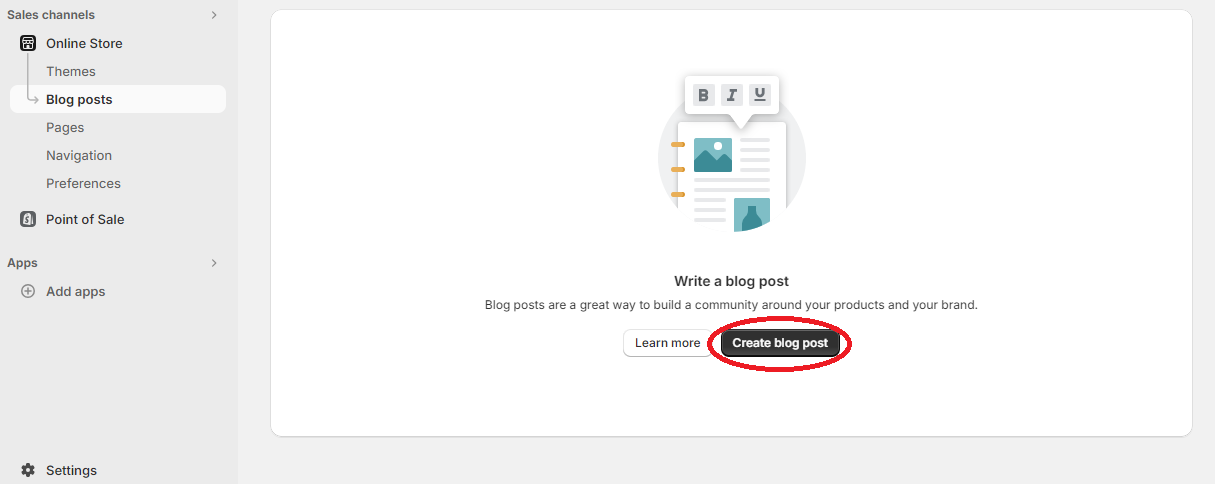
1. Go to Online Store > Blog Posts.
2. Click on Create blog post.
3. Enter a title for the blog post in the Title field.
4. Write your blog post in the Content field.
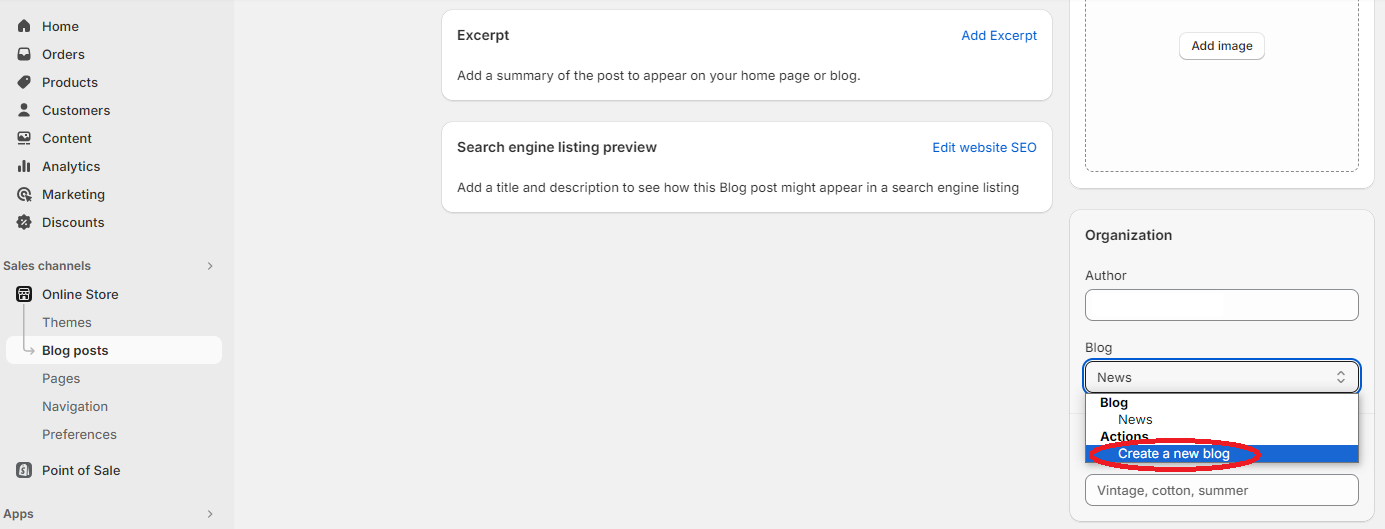
5. Select Create a new blog in the Organization section of the Blog drop-down menu.
6. Enter a title for your blog in the Blog title field.
7. Click on Save.
On-Page SEO
There are several things you can do to improve the search engine optimization at the page level. These techniques work together with your site-level and offsite efforts to boost your online presence and increase your web traffic.
Make Sure You’re Targeting the Right Keywords
We presume at this stage that you have a basic understanding of keywords and are trying to incorporate them into your website content. However, targeting the wrong keywords will either fail to bring relevant traffic to your Shopify store, prevent your pages from ranking on page one of search engine results pages (SERPs), or both.
Ask yourself the following when performing keyword research:
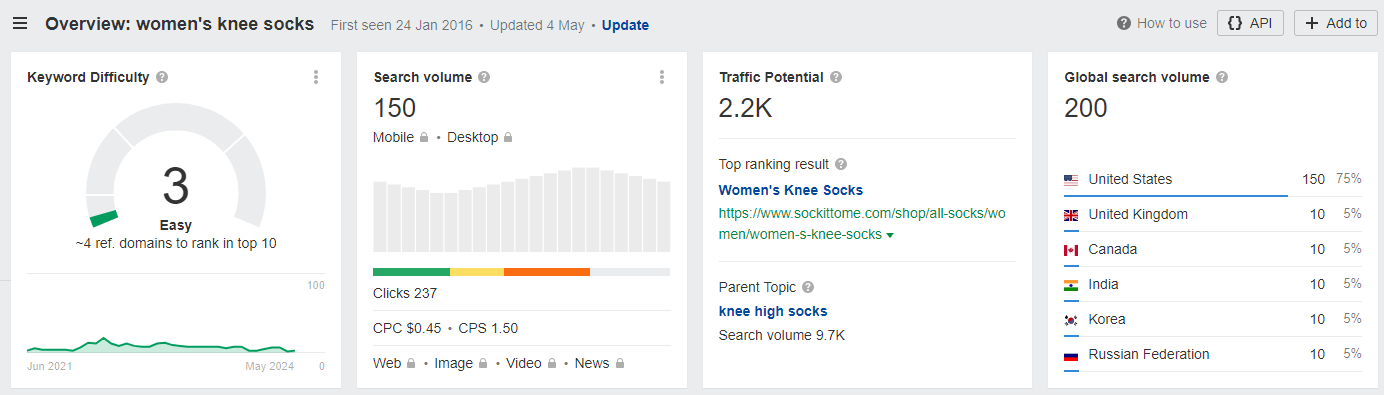
Is this keyword general enough that people search for it? A potential customer is more likely to search for “women’s knee socks” than “Sol Rainbow Women’s Knee Socks L 2446 Organic Cotton.” You can use a free tool like Google AdWords or Ubersuggest, or a paid tool like Ahrefs, to see how many people search for a given term each month.
Is this keyword specific enough that I’ll be able to rank for it? Very general terms are difficult to rank for because marketplaces like Amazon tend to come out on top. Again, you are more likely to rank for “women’s knee socks” than simply “socks.” In Ahrefs, “women’s knee socks” has a keyword difficulty score of 3 (and a low-medium global search volume) whereas “socks” has a keyword difficulty score of 43 (and a much higher search volume). As expected, Amazon has the top-ranking result for “socks.”
Does the search intent of this target keyword match the nature of the target page?
Search intent is everything when it comes to selecting target keywords. Enter each keyword into the search bar in Google and make a note of the kinds of pages that appear in SERPs. Are they product pages? Category pages? Home pages? Or information-gathering results (such as blog pages)?
You’ll generally find that short-tail keywords are associated with commercial pages whereas long-tail keywords are associated with information-gathering pages.
Example: Google search for the short-tail keyword “cotton socks”
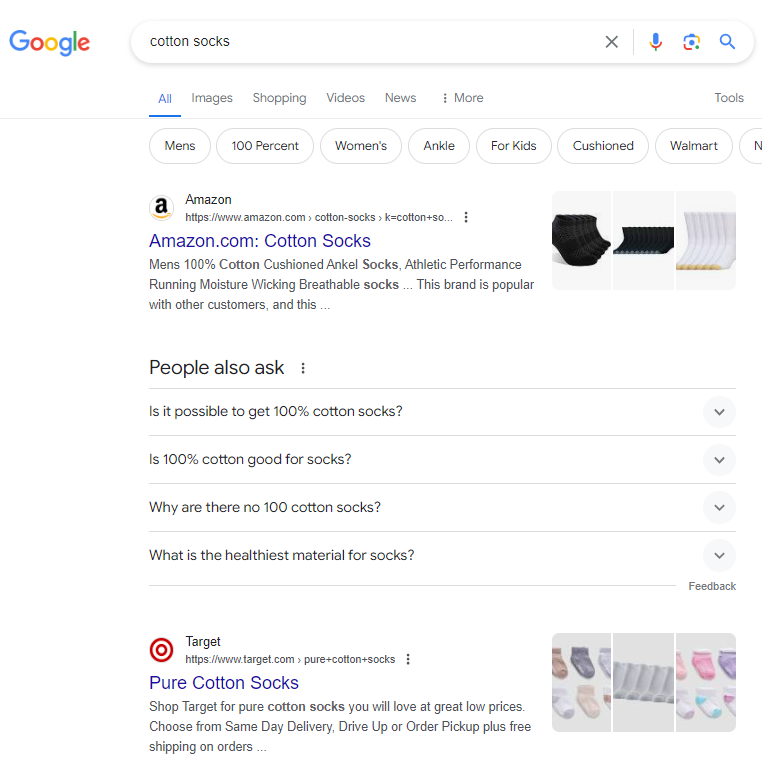
The top results are commercial pages accompanied by a list of long-tail PAAs.
Example: Google search for the long-tail keyword “what are the benefits of cotton socks”
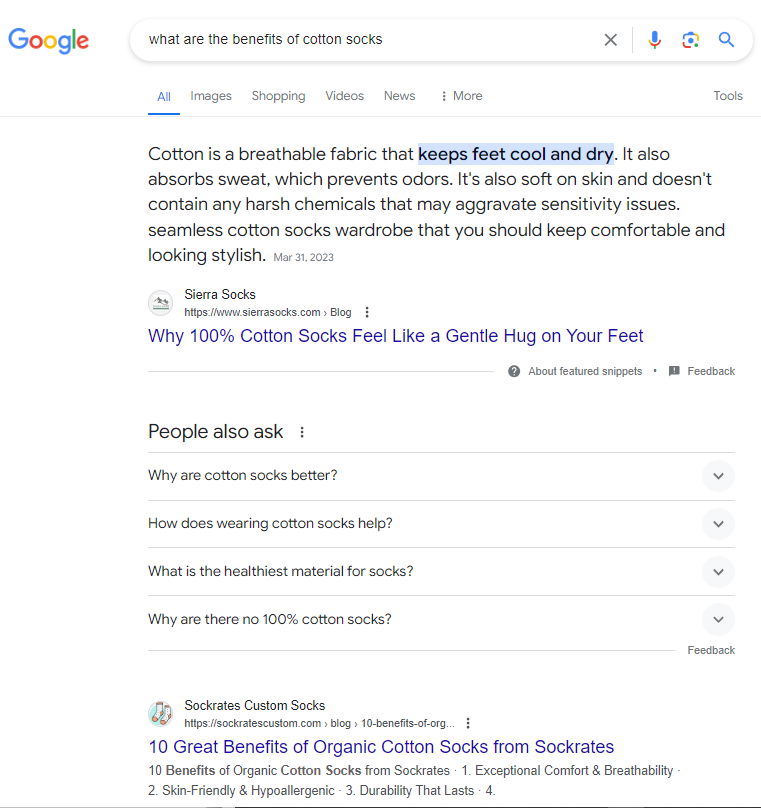
Here, the top results are information-gathering pages.
It’s also important to keep in mind that the search intent of keywords can change over time. A keyword might start off generating information-gathering results in SERPs if the product type is new to the market and commercial pages once customers become familiar with the product.
The keyword “walking assist robot,” for example, returns informational results at the time of writing (2024). However, this may change in the future.
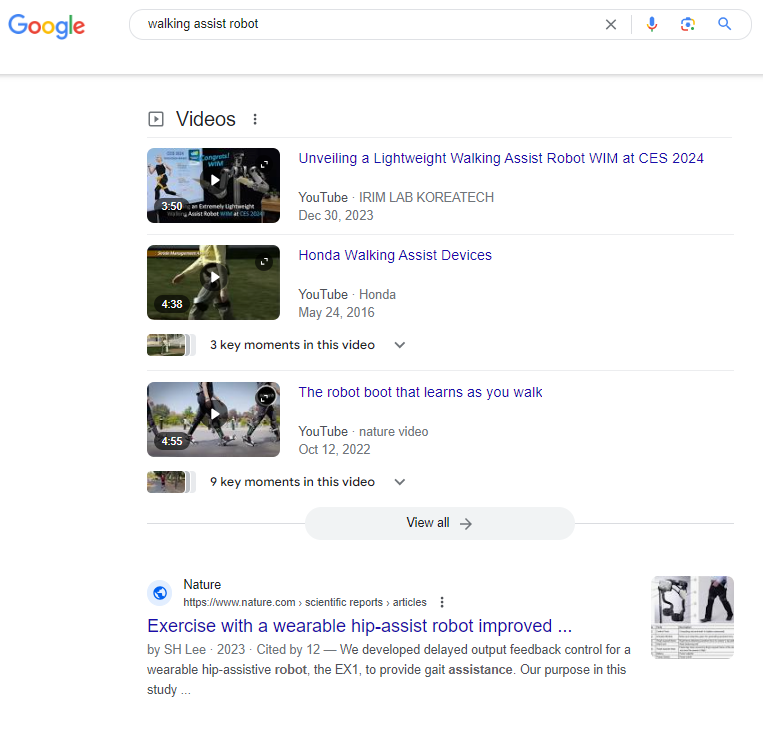
What other terms do customers use when searching for the kinds of products I sell?
You know more about your products than your customers. You also live in a particular geographical region that uses specific terms for specific things. To connect with potential customers who are less familiar with your products and who live in other places, you’ll need to target the keywords that they would use when searching for your products.
Let’s take “knee socks” as an example. Customers looking for knee socks might search for:
“knee-high socks”
“knee-highs”
“high socks”
“long socks”
Some customers might search for “knee socks” (which finish just below the knee) but really be looking for “over-the-knee socks.” You need to target all of the relevant keywords when creating your landing pages and educate website visitors on the definitions and correct terms for the products you sell.
How to Incorporate Keywords in Shopify
Your target keywords should be incorporated into the body text of each page as well as in:
The H1 heading
H2 and H3 headings, where appropriate
The title tag
The meta description
The page URL
Image alt text (if it works naturally)
Image file names
Current Shopify store owners should be familiar with the processes required to edit these fields. If not, please refer to the instructions provided in the following sections.
Improve the Effectiveness of Your Metadata
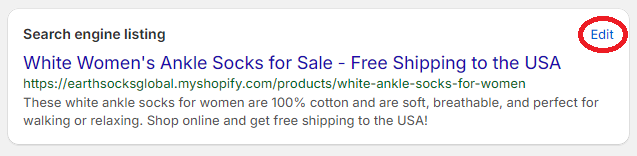
Effective metadata (title tag and meta description) includes the keyword of the target page and entices potential customers to click on the search result. You can update the auto-generated title tags and meta descriptions for each page in your Shopify store by going to the Search engine listing preview section on the product page and clicking on Edit.

Title Tags
Effective title tags accurately reflect the contents of the target page and should include key value propositions where applicable to entice the customer to click.
This is an example title tag for a category page:
Anti-Slip Children’s Slipper Socks for Sale - Free Shipping to USA
Meta Descriptions
Effective meta descriptions should include a brief summary of the target page and a call to action (CTA) telling the reader what you want them to do.
This is an example meta description for the category page above:
Earth Socks sells children’s slipper socks with anti-slip rubber and soft, easy-wash cotton fabric. Shop online in one click and receive free shipping to the USA.
Pro tip: Title tags and meta descriptions that are too long will be truncated in search results. Use a tool such as the Google SERP Snippet Optimization Tool from Higher Visibility to check that your text is within the limit before saving your updated metadata in Shopify.
Improve Your Page URLs
Shopify automatically creates logical URLs that follow a consistent pattern. However, you can edit the auto-generated URL slug (the last part of the URL) for any page by clicking Edit or Edit website SEO on the Search engine listing preview at the bottom of the page.
Shopify store owners can improve their page URLs by editing them to include the page’s target keyword. For the above example, the ideal URL would be:
https://earthsocksglobal.myshopify.com/childrens-socks/childrens-slipper-socks
Improve Your Image Alt Text
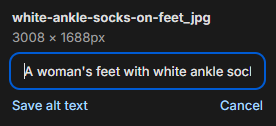
Google and other search engines use alt text to improve accessibility for vision-impaired internet users and internet users with a slow connection. This description can be read aloud by screen readers and is displayed if an image fails to load.
A good image description will describe the image accurately while also using the page’s target keyword. Make sure your image descriptions are serving the primary purpose of accessibility and that the primary keyword is only used if it fits naturally into the description.
How to Edit Alt Text in Shopify
To edit alt text for an image in Shopify, click the Edit button on the image, click Add alt text, enter your description, and click Save alt text.
Improve Your Image File Names
Most Shopify store owners upload images using non-descriptive filenames (IMG006.JPG). However, you miss out on a great SEO opportunity when you do this. Descriptive image file names (up to six words joined with hyphens) help Google display your images in Google Image search results. Provide a complete but succinct image description in the file name and incorporate the primary keyword if it makes sense to do so.
For example:
white-ankle-socks-on-feet.jpg
Please note: Shopify doesn't allow you to update image file names directly. You will have to rename the image files on your computer, delete the current images, and upload the images again with their new file names.
Improve Anchor Text for Internal Links
Anchor text is the text that points to another page with a hyperlink. Using descriptive anchor text helps internet users and search engines understand the content of the linked page much better than “click here.”
The following anchor examples accurately describe the contents of the target page:
Internal link to a product page:
“Our six-pack of unisex children’s slipper socks is a great holiday gift idea for larger families.”
Internal link to a category page:
“Children’s slipper socks feature non-slip rubber dots on the sole so they can be worn safely without the need for additional slippers or shoes.”
Internal link to the home page:
“We founded Earth Socksin 2023 to provide ethical, sustainable, and durable socks for individuals and families around the USA.”
Internal link to a blog post:
“Knowing how long socks should last will help you determine whether the brand you currently buy is truly cost-effective.”
Internal link to the Contact Us page:
“Contact us for more information about wholesale pricing.”
The beauty of well-optimized anchor text is that you get double the SEO value: Both the source page and the target page may appear in SERPs when an internet user searches for a term that is relevant to both pages.
Improve Your Website Copy
Thin or missing copy on commercial pages is an issue that frequently comes up in Shopify SEO audits. Your category and product pages need to have unique text that describes the featured item or items, explains how they are typically used, and communicates your key value propositions to potential customers. This helps you rank higher than vendors without unique copy.
For best results, write enough to help the visitor understand the page and its content (product or category), work in one or two highly relevant keywords, and add internal links to related onsite pages within the body text. Your copy should be broken up into short paragraphs with subheadings (depending on the length) to make it easy to skim.
Leverage the Power of On-Page Product Reviews
Another way to boost the on-page SEO value of your product pages is to get (and display) product reviews. You will need a plugin to add reviews to your Shopify store. There are paid and free review apps available. Once you have chosen an app, click on Install app and add the reviews widget to your product page template.
User-generated content in the form of customer reviews builds a tremendous amount of trust with potential customers and provides valuable feedback that you can incorporate into your product design and product instructions. The ratings customers give each product may also appear in the rich snippets for your product pages. This can have a huge impact on click-through rates from SERPs.
Pay Attention to E-E-A-T
E-E-A-T stands for experience, expertise, authority, and trust. E-E-A-T has become critically important for SEO and is something Shopify store owners can no longer afford to ignore. To improve E-E-A-T on your website, you need to show your brand’s trustworthiness and expertise in your field. For example:
Make sure you have brand information displayed prominently—including an About Us page, contact information, a map, and links to your social media profiles.
Display your brand’s certifications, awards, third-party reviews, and any press coverage prominently.
Provide authorship information at the end of each blog article that names the author and explains his or her expertise in the subject matter at hand.
Explain how you evaluated products or services if presenting a listicle of “the best XYZ.”
Back up medical, legal, and financial claims with high-authority evidence.
Add disclaimers where necessary.
Add Schema Markup (Structured Data)
Schema markup provides Google with the information it needs to highlight relevant page details, images, and videos in rich snippets. Think of it like adding tags to help Google better read the contents of each page.
You can add structured data manually in Shopify using the article.liquid template file or custom script. Alternatively, you can hire a developer or use a Shopify app to add structured data. The most useful kinds of structured data for Shopify stores include:
Product schema
Image schema
Video schema
Organization schema
CollectionPage and OfferCatalog schema
BreadcrumbList schema
Article schema
You can check your structured data using Google’s Rich Results Test.
Off-Page SEO
Off-page SEO is just as important for ranking well in search results as on-page SEO. Off-page SEO shows Google how authoritative and useful other web users consider your website to be. The more other web users link to your website, the more weight Google will give it in search results.
Conduct a Citation Audit
Correcting and taking full advantage of citations is one of the pillars of off-page SEO. If your brand has been around for a while, you probably have several listings in online directories. Other web users and even news sources may also have written about your products and brand.
To improve your off-site SEO and increase trust with potential customers:
Google your brand and double-check your brand’s information in directory listings for accuracy. You may have updated your brand name, phone number, or address, and these entries will likewise need to be updated.
Use Google search operators to find mentions of your brand or links to your website on other sites. Contact those websites if any of the information is incorrect, request that they link back to your website if they mention your brand, or claim any quotes or statistics that are yours but link back to a secondary source.
Improve Your Backlink Profile
Backlinks work as “votes of confidence” for your Shopify website. Links that point back to your website show that others consider your website to be valuable. This, in turn, improves your ranking in SERPs.
When it comes to SEO, however, all backlinks are not created equal. Keep the following in mind when looking for backlink and guest posting opportunities:
Only one backlink from each domain counts as a “vote of confidence.” Multiple backlinks from the same domain have no additional benefit for SEO.
Backlinks should come from websites that are relevant to your niche. Backlinks from irrelevant domains will generally be devalued and could lead Google to suspect that you are engaging in link spam.
Backlinks from high-authority domains count for more than backlinks from low-authority domains.
Backlinks that were paid for (such as in a sponsored guest post) must be tagged “nofollow” or rel=“sponsored” or you could also be penalized by Google. Keep in mind that these kinds of links can bring relevant web traffic to your Shopify store even if they don’t increase your website’s perceived authority in the eyes of search engines.
Make Sure You’re Using Your Google Business Profile to its Full Advantage
Google Business Profile (formerly Google My Business) is free for businesses to use and can boost your SEO in several ways:
Promote visibility in local search
Provide valuable backlinks to your website
Build trust with potential customers
Motivate potential customers to check out your Shopify site
Check that your GBP profile is 100% complete, that the phone number, address, and opening hours are up to date, and that your Shopify website address is correct. The business description should be captivating and should include a call to action to motivate readers to go to your desired page.
Make Sure You’re Using Reviews to their Full Advantage
Monitor reviews on third-party websites and respond professionally. Highlight the most glowing reviews on your website to boost trust with potential customers and use feedback from negative reviews to improve (be sure to respond courteously and do what you can to make amends).
Improve Your Technical SEO
Technical SEO is essential for improving SEO on Shopify. However, it requires more technical know-how than the previous techniques.
Conduct a Technical SEO Audit
Improving your technical SEO begins with conducting a Shopify SEO audit using Google Search Console, an SEO app for Shopify, or professional SEO tools. The audit may uncover any of the following issues, which you can fix yourself or hire a developer to fix for you:
Broken links - You or a developer can add redirects using Shopify’s built-in redirection tool.
Duplicate pages - Shopify handles this issue internally. However, you or a developer can specify a URL to make a specific URL canonical using the global Liquid canonical_url object.
Crawling issues - Crawling errors can help you or a developer identify broken pages (404s), redirect chains (301s, 302s, etc), and any other issues that are presented in the Google Search Console indexing report.
Redirecting traffic from non-www versions of your domain is also important for avoiding duplicate content issues. To fix this, go to Settings > Online Store > Domains, select Set as Primary, and check the Redirect all traffic box.

Improve Page Loading Speed
Google favors websites that load quickly. There is a good reason for this. The probability that a web user will bounce increases by 32% as the loading time of a page increases from 1 to 3 seconds.
To improve your page loading speed:
Uninstall any unnecessary plugins.
Remove any inline frames (iframes) from your website.
Compress image file size.
Check your loading speed with Google's PageSpeed Insights tool.
Make Sure Your Site Is Optimized for Mobile
Most Shopify shop orders are placed on mobile devices (page 9 of the linked PDF) and Google is a mobile-first index, so the mobile version of your site is the main version in Google’s eyes. You must have a great mobile site version or you will miss out both on ranking potential and sales.
Shopify themes are mobile-responsive by default (they change the size and layout to match the device). However, that doesn't mean they provide a great user experience on mobile. You may need professional assistance from a developer to make your website easy to navigate and use on a mobile device. You can test the mobile version of your Shopify website using Google Lighthouse.
Other Tips for Improving Shopify SEO
The following are a couple of final considerations for improving SEO on Shopify.
Install the Google Channel
Installing the Google Channel provides an additional avenue for helping your products appear in organic search results by having them appear in the Shopping tab. This is something you can do once and your products will then automatically appear in Google Shopping results from then on.
To install Google Channel from your Shopify account:
1. In the admin panel, go to Sales channels and select Google & YouTube.
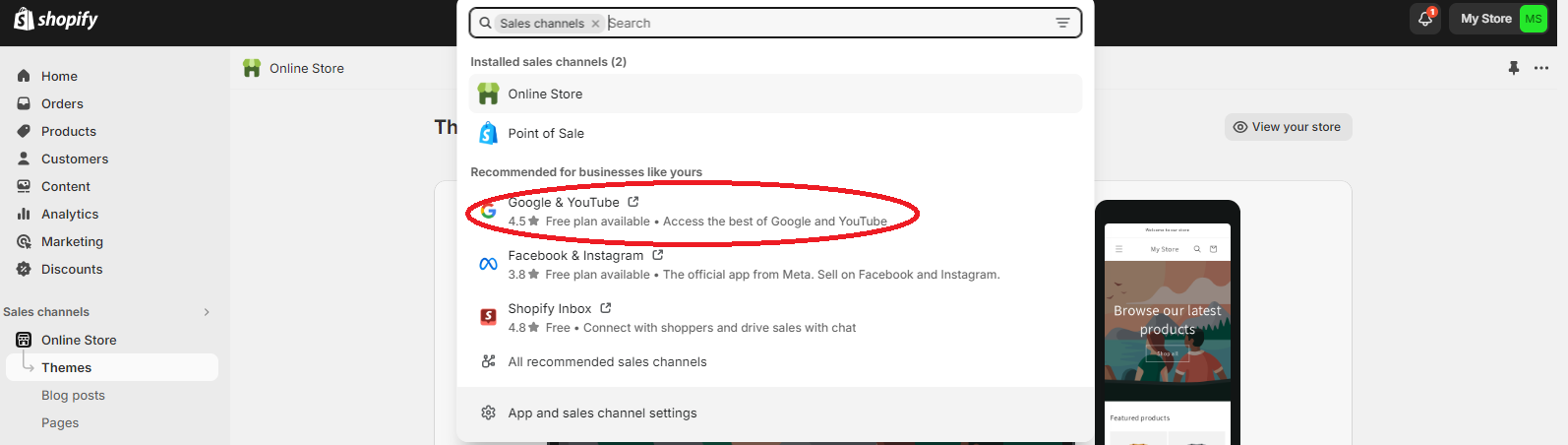
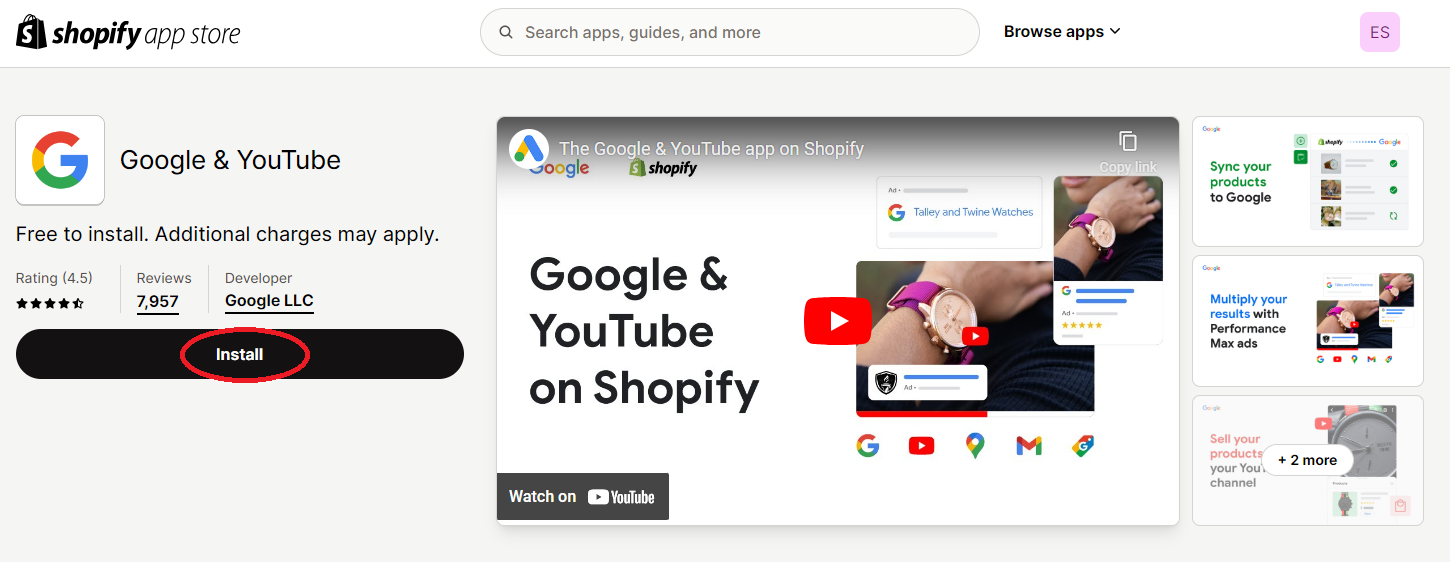
2. Click Install.
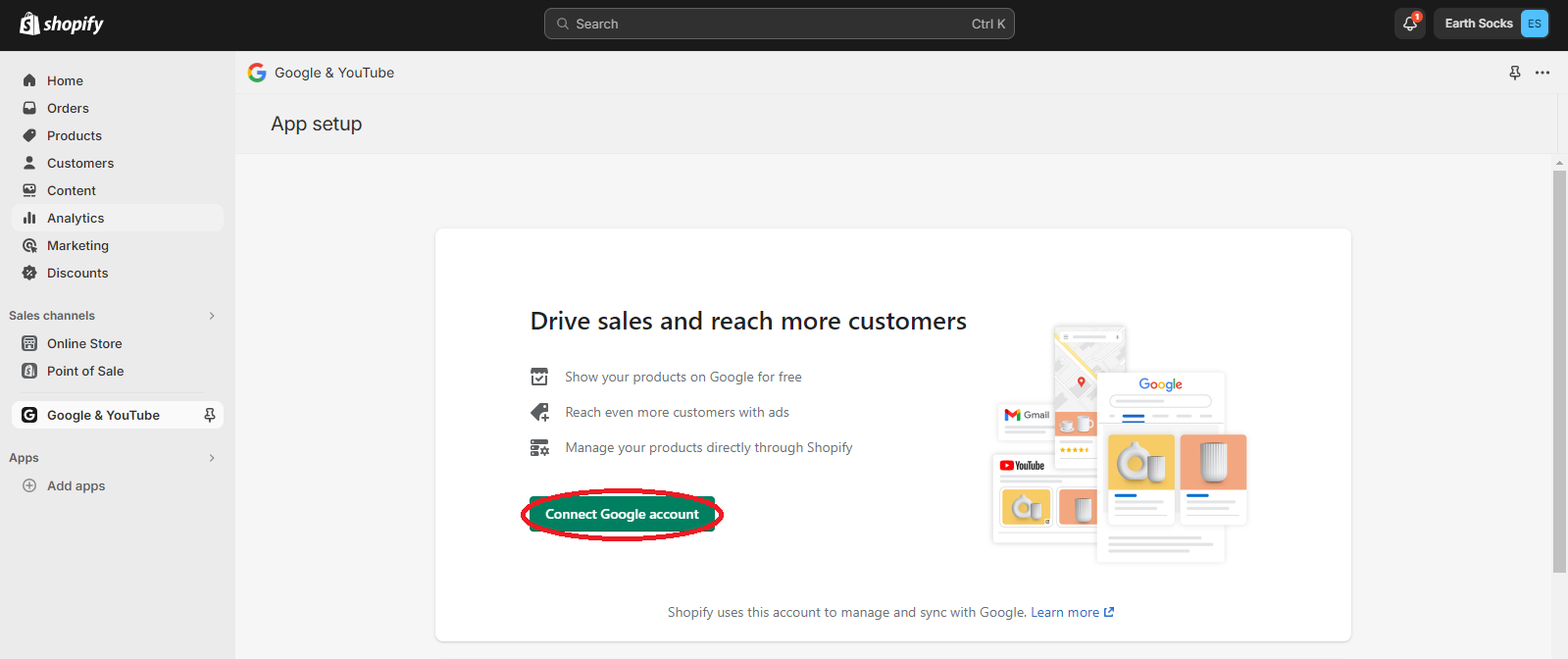
3. Click on Connect Google account.
4. Select a Google account or make a new one. Give Shopify permission to access your Google account information.
5. Create a Google Merchant Center Account ID if you don’t have one already.
6. Check the setup requirements for your Shopify store and make any necessary changes.
Continue to Monitor, Audit, and Improve Your SEO
Steps taken to improve your ranking in organic search will have a much longer-lasting impact than investing in paid ads. However, you must continue to monitor, audit, and improve your SEO over time to maintain your position in SERPs. There are several reasons for this:
Search engine algorithm changes mean pages are ranked using different criteria than before.
Webmaster guidelines change.
Website errors (including broken links) impede web crawlers’ ability to crawl and index your site effectively.
Outdated content will be pushed further down in search results.
Rest assured that your ongoing SEO efforts will be well rewarded. Our Shopify clients more than triple their year-over-year revenue from organic search (on average) thanks to our SEO, CRO, and UX efforts.
Rank Better and Increase Your Shopify Revenue
Improving both on-page and off-page search engine optimization for your Shopify store makes a significant difference to your rankings in organic search and also to your potential revenue. Changes as simple as editing your metadata and adding image alt text can improve your visibility in SERPs and click-through rates.
Shopify merchants accounted for more than 10% of U.S. ecommerce sales in 2021 and the platform experienced a 22% increase in revenue between Q1 2021 and Q1 2022. People are spending money in Shopify stores. Make sure you get your piece of the pie!
